The Small but Growing World of eSIM Tablets
eSIM technology has become common on many smartphones, yet tablets are still catching up. A physical SIM card slot remains standard on plenty of cellular tablets, and some models skip mobile data entirely. That can make shopping for an eSIM tablet feel a little more limited than shopping for an eSIM phone.
Still, there are solid choices available. Samsung is among the brands offering eSIM support on selected tablet models, particularly within the Galaxy Tab S9 family. This gives buyers a practical option for using mobile data without needing to handle a tiny plastic SIM card.
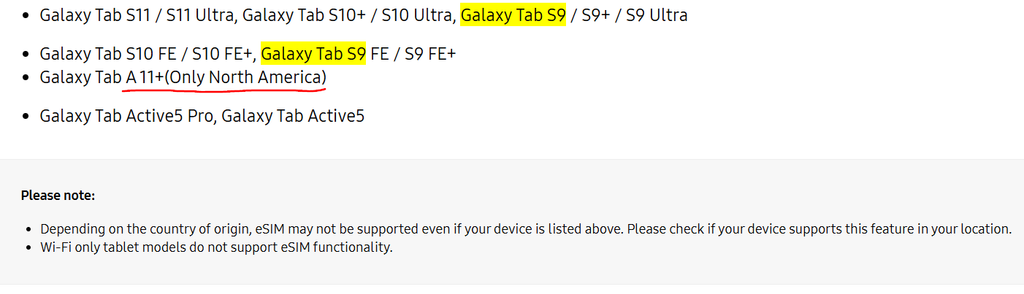
As for S9 family, the variants we find from Samsung’s official website are the Galaxy Tab S9, Galaxy Tab S9+, Galaxy Tab S9 Ultra, Galaxy Tab S9 FE, and Galaxy Tab S9 FE+.
That is a fairly useful spread of devices. There are compact premium models, larger productivity-focused screens, and more budget-friendly FE versions. So, buyers are not stuck choosing only the most expensive tablet to get eSIM capability.
Why eSIM Support Matters on a Tablet
An eSIM is a built-in digital SIM. Instead of inserting a physical card, you can activate a mobile plan through your carrier or by scanning a QR code. On a tablet, that means less fuss when setting up data access away from Wi-Fi.
This can be handy for commuters, students, remote workers, and frequent travelers. You can check messages, join video calls, stream music, use maps, or work on cloud files without relying on a public Wi-Fi network.
It keeps things simple.
For travel, eSIM can be especially useful. Rather than hunting for a local SIM card shop after arriving in a new country, you may be able to purchase a compatible data plan online and install it before leaving home. Availability depends on the network provider and country, though.
There is another small benefit: fewer moving parts. A physical SIM tray can be easy to lose or damage, especially if you swap cards regularly. An eSIM removes that particular annoyance.
Samsung Galaxy Tab S9 Series at a Glance
The Galaxy Tab S9 range is Samsung’s modern Android tablet family, with different sizes and price points. The core premium line includes the Galaxy Tab S9, Galaxy Tab S9+, and Galaxy Tab S9 Ultra. The Galaxy Tab S9 FE and Galaxy Tab S9 FE+ sit in a more affordable position.
All five models are listed as Samsung eSIM tablet options. That makes the lineup easier to compare because you can focus on screen size, power, budget, portability, and the way you plan to use the device.
A smaller tablet is easier to carry every day. A bigger one feels more comfortable for multitasking, movies, drawing, note-taking, and office work. The best fit depends on your routine rather than a simple “bigger is better” rule.
Samsung Galaxy Tab S9 and Galaxy Tab S9 Plus
The Samsung Galaxy Tab S9 is a sensible choice for people who want a premium tablet without carrying a giant screen everywhere. Its more compact format suits reading, browsing, watching videos, taking notes, and casual work sessions in cafés, trains, or classrooms.
Adding eSIM support makes that portability more useful. You can take the Tab S9 out for the day and stay connected without tethering it to your phone. For many people, that is enough freedom without paying for the largest model in the range.
The Galaxy Tab S9+ gives you more screen room. It is better suited to people who split their screen between apps, review documents, edit images, or spend longer periods watching content. The larger display can make work feel less cramped.
Both options sit in the premium section of Samsung’s tablet catalog. If you want a balance between mobility and a capable, polished Android tablet experience, these two deserve close attention.
Samsung Galaxy Tab S9 Ultra for Bigger Screen Needs
The Galaxy Tab S9 Ultra is built for people who want as much screen space as possible in a tablet. It is the model to consider if a standard tablet display feels too small for your daily tasks.
That extra room can help with side-by-side apps, longer writing sessions, large spreadsheets, sketching, video viewing, and presentations. Paired with a keyboard accessory, it can feel closer to a lightweight laptop setup for certain types of work.
It is big, though.
That size is great at a desk, on a sofa, or during travel where you have a bag with enough space. It may be less comfortable for one-handed reading or quick use while standing. eSIM support helps the Ultra stay connected beyond your home or office Wi-Fi, which suits people using it as a mobile workstation.
If your priority is maximum display area, the Tab S9 Ultra is the obvious Samsung eSIM tablet in this group.
Samsung Galaxy Tab S9 FE and Galaxy Tab S9 FE Plus
The Galaxy Tab S9 FE and Galaxy Tab S9 FE+ provide another route for buyers who want eSIM capability but do not need the highest-end tablet specifications. The FE name generally points toward a more accessible price category within the wider Galaxy Tab family.
The standard Tab S9 FE is the more compact option, making it useful for schoolwork, web browsing, streaming, digital notes, and day-to-day apps. It can suit someone who wants cellular data for occasional travel, commuting, or backup connectivity.

Samsung Galaxy Tab S9 FE – 128GB, Gray
- Display: 10.9″ TFT, 90Hz
- Battery: 8000mAh
- Storage: 128GB, 6GB RAM
- Camera: 8MP rear, 12MP front


The Tab S9 FE+ brings a larger display into the more affordable part of the lineup. That extra space can be welcome for families, students working with documents, and people who prefer a roomier screen for entertainment.
These models show that eSIM tablets do not have to be reserved for buyers shopping at the top end. They give more people a chance to use flexible mobile connectivity without stepping up to the S9 Ultra or S9+.
Things to Check Before Buying an eSIM Tablet
Before buying, check that the exact version sold in your country supports eSIM. Tablet features can vary by market, carrier arrangement, and model number. A product page for another region may list different connectivity options.
You should also confirm that you are looking at a cellular version rather than a Wi-Fi-only version. Wi-Fi models do not use a mobile network plan, so eSIM support will not help there.
Carrier support matters too. Some mobile providers allow tablets on eSIM plans, while others have limited plan choices or require a separate data line. Ask about monthly costs, data limits, roaming rules, and activation steps before purchasing.
Think about storage, screen size, battery habits, accessories, and weight. eSIM is useful, but it should not be the only reason you choose a tablet. A device that feels awkward to carry or lacks enough storage can become frustrating fast.
Is a Samsung eSIM Tablet Right for You
A Samsung eSIM tablet makes sense if you regularly work, study, travel, or relax away from dependable Wi-Fi. It is particularly useful for people who prefer their tablet to stay independently connected instead of borrowing data from a phone.
The Galaxy Tab S9 and Tab S9+ suit buyers seeking premium performance in manageable sizes. The Tab S9 Ultra is aimed at people who want the largest screen for serious multitasking or media use. The Tab S9 FE and Tab S9 FE+ are worth considering if price matters more than having Samsung’s highest-tier hardware.
In the end, eSIM support adds convenience. Pick the screen size and budget that fit your everyday life, confirm regional compatibility, and choose a data plan that does not cost more than the freedom is worth.
Discover the perfect Samsung Galaxy Tab S9 for your needs. This guide provides a detailed comparison of the Tab S9 models, highlighting features like the S Pen, Dynamic AMOLED 2X displays, and DeX capabilities.