One tiny chip, endless possibilities — ready to ditch the SIM tray and travel lighter?
eSIMs are quietly rewriting how we use phones. They remove tiny trays, speed up switching carriers, and make traveling less of a SIM-scramble. Shorter lines at the airport, please.
Meet three of the freshest eSIM-ready phones from the biggest names: a foldable productivity titan, a camera-and-AI champ, and a pocketable style star. Each promises modern eSIM convenience — but they shine in different ways.
Top Picks
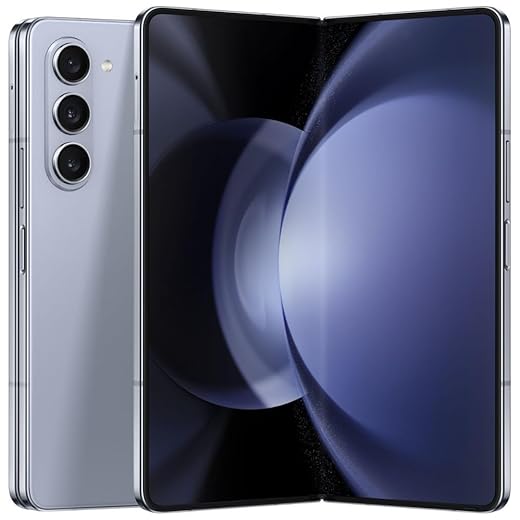


Galaxy Z Fold5 — Foldable Productivity Powerhouse
A true foldable for power users who want a phone that doubles as a compact tablet for productivity and media. Its large inner screen, refined hinge, and multitasking features create a genuinely useful multi-window experience.
Who should consider this phone
The Galaxy Z Fold5 is built for people who want a single device to handle phone duties and tablet-grade productivity. It's especially appealing to multitaskers, content creators, and professionals who run multiple apps side-by-side and value a larger canvas for editing, reading, or spreadsheets.
Standout features and benefits
These attributes make the Fold5 practical in contexts like review meetings (view two documents at once), content editing (large timeline and preview), and when you want a tablet experience without carrying a second device. The multi-window capability is not just a gimmick — it meaningfully changes how multitasking feels on a phone-sized device.
Limitations and purchase advice
Foldables remain more delicate and pricier than slab phones. Even though the Fold5 improves durability, the device is heavier and bulkier for pocket carry and demands mindful handling. When buying a renewed Fold5, examine seller warranties and the hinge/display condition specifically; crease visibility and long-term hinge wear are common concerns for second-hand foldables.
Practical examples and user tips
For users who prioritize a larger screen for productivity and content creation, the Fold5 delivers a unique balance of power, software refinement, and durability improvements that make it the most practical foldable for everyday professional use.
Pixel 8 5G — Compact AI Phone
Delivers class-leading computational photography and useful on-device AI that simplifies everyday tasks like photo editing and quick searches. The compact form factor, clean Android experience, and dependable battery life make it a well-rounded choice for most users.
What this phone is for
The Pixel 8 is designed for users who prioritize a clean Android experience, AI-enhanced tools, and top-tier still photography in a compact package. It focuses on delivering smart features that save time — from Circle to Search to Best Take for group photos — while keeping the interface simple and secure.
Key features and daily benefits
These components add up to smooth daily performance: responsive scrolling and apps thanks to the 120Hz panel and Tensor G3, and standout photos in varied lighting thanks to Google's image processing. eSIM support makes it convenient for travelers who switch carriers or use local eSIM plans without swapping physical SIMs.
Limitations and practical considerations
The unit referenced is a renewed/unlocked model, which means cosmetic condition can vary between sellers and the warranty window may differ from a new device. A few users reported concerns about bootloader or carrier locks in some renewed listings — check the seller notes and return policy before purchase. Also, while battery life is strong relative to the compact size, power users who run extended gaming or heavy multitasking may see shorter uptime than larger-flagship phones.
Tips and real-world insight
Overall, this device balances compact design, AI-driven convenience, and class-leading photo strengths, making it ideal for users who want a powerful phone without a large footprint.
Galaxy Z Flip5 — Compact Foldable Performer
Combines a playful, pocket-friendly design with practical improvements like a full cover screen and Flex Mode for hands-free photos and video. It's a great pick for users who want a compact device without sacrificing modern performance or a compelling selfie experience.
Who this phone suits
The Galaxy Z Flip5 is aimed at style-conscious users who prioritize portability and social-media-ready camera features. It’s ideal for people who want a compact device that still offers the latest hardware and a distinctive foldable interaction model.
Key features and advantages
These features enable real-world benefits: you can check messages and control music without opening the phone, take steady videos on the fly using Flex Mode, and carry a device that fits easily into small pockets or compact bags. The large external display is genuinely useful for quick tasks that previously required opening the device.
Limitations and usage advice
Battery capacity is smaller than many full‑size phones, so heavy streaming or prolonged camera sessions will reduce uptime more quickly. Durability is improved but foldables still require considerate handling — a protective case and a screen protector are highly recommended. Renewed units can vary in condition, so inspect seller details and return policies if buying used.
Practical tips and user scenarios
If you want a conversation starter of a phone that pairs fashion with functionality, this model provides a compelling mix of convenience and creativity while staying small enough for everyday carry.
Final Thoughts
Pick the Galaxy Z Fold5 if you want the most productive eSIM phone available. Its expansive inner display and true multi-window workflow turn mobile tasks into desktop-style work, perfect for professionals, creators, and multitaskers who use many apps at once. The Fold5 pairs eSIM convenience with a tablet-like canvas — ideal if you edit documents, split-screen apps, or carry work on the move.
Choose the Pixel 8 as your second pick (or as the primary choice if you value camera performance and on-device AI). It’s the best balance of everyday power, computational photography, and smart features that simplify life: fast photo fixes, helpful AI tools, and straightforward eSIM setup. Great for travelers, social creators, and anyone who wants strong cameras in a compact package.
If you prize pocketability and playful design over raw productivity, the Galaxy Z Flip5 is the style-forward alternative: top for selfies, hands-free shooting, and a small footprint in your pocket or purse.
Buying and Using eSIM Phones — Practical Guide
Quick checklist before you buy
How eSIM works in real life (short and useful)
An eSIM is a programmable SIM profile stored inside the phone. Instead of inserting a card, you scan a QR code or enter a carrier activation code. Benefits you'll notice:
Setting up or transferring an eSIM — step-by-step
- Verify your carrier supports eSIM for your device model.
- Request an eSIM activation from the carrier (QR code or activation code).
- On the phone: Settings > Network & Internet (or Connections) > Add carrier. Scan QR or enter code.
- Label profiles (e.g., "Work", "Travel") and set a default for calls/data.
- If porting your number, follow carrier prompts — keep a short overlap period to verify the transfer.
Tips: Keep a screenshot of QR codes or activation details until activation completes. If anything fails, carrier customer care can remotely push the profile.
Travel, dual numbers and workflow ideas
Quick comparison (high-level)
| Phone | Best for | Expert rating | Form factor | eSIM support | Standout strength |
|---|---|---|---|---|---|
| Galaxy Z Fold5 | Productivity and multitasking | 9.2 out of 10 | Large foldable inner screen | Yes | True multi-window workflow for power users |
| Pixel 8 | Camera-first and AI features | 8.8 out of 10 | Compact slab | Yes | Computational photography and on-device AI |
| Galaxy Z Flip5 | Pocketable style & selfies | 8.7 out of 10 | Clamshell foldable | Yes | Full cover screen and hands-free Flex Mode |
Final practical notes
With these three eSIM-ready phones, you get modern flexibility no matter your priority: massive productivity on the Fold5, camera and smart features on the Pixel 8, or pocket-first style with the Flip5. Your eSIM makes switching between those lifestyles faster than ever.
FAQs
Yes — many modern phones (including these three) support multiple eSIM profiles. However, how many can be active simultaneously depends on the model and carrier. Often you can keep multiple profiles installed and switch between them instantly; some phones also allow one eSIM + a physical SIM to be active together.
No. eSIMs don’t inherently lock you in. Carrier locking is a separate policy. Before switching, check whether your phone is unlocked. If it’s carrier-locked, request an unlock from your provider. Once unlocked you can move eSIM profiles between carriers just like a physical SIM.
Not really. Most carriers provide a QR code or activation code you scan in the phone’s cellular settings. The Pixel 8 and Samsung Fold/Flip streamline the process with guided prompts. Still, confirm your carrier supports eSIM and have account details ready.
eSIMs make short-term travel easier: you can add a local data profile without swapping physical SIMs. Buy a local eSIM plan (from a carrier or eSIM provider), activate it from the phone, and leave your home number on another profile if needed. It’s faster and cleaner than juggling tiny SIM cards.
No significant battery hit from eSIM itself. Battery life depends on device hardware, screen size, and usage. Foldables (like the Fold5) have larger screens and multitasking loads that can use more power, while the compact Pixel 8 is more battery-efficient in typical daily use.
Yes. Many carriers support porting your number to an eSIM. The exact process varies: some let you request eSIM activation via carrier app, website, or in-store. Keep your account info and ID ready, and expect a short activation window or confirmation SMS.